Saturday, November 30, 2013

Enemies shoot back, Selection cursor


The guy with the sword in the screenshot above is about to take an arrow, shot by the rat archer in the far left.

There's quite a lot still to do for this version. The One Game A Month Website allows a few days of slack at the beginning of the next month to finish up a project, and I'm probably going to make use of that this time around, getting some more big features into this game.

Still on the TODO list:

  • doors that open and close - would be nice, probably won't happen for this month
  • NPCs retreating from the map - low priority, but it'd be nice to see them flee from you.
  • NPCs pathfinding to get good ranged attacks - right now, an NPC with a ranged attack will use it if there are targets within 5 hexes (or, maybe 4 hexes, depending on how my visibility code is working). If it can't find any good targets to shoot at, it'll find a path to a valid target, and follow that path. But what it should be doing is finding a path to a good shooting position, which might be behind something that blocks movement, but not visibility. Hm, the right way to do that would be to calculate visibility from the potential target, and pathfind into the target's visibility range.
  • enemies being created by a data-driven factory - all games need rat factories. Right now, I create all the NPCs with the same constructor, then for the archers, I set a flag afterwards, indicating that they have a ranged attack. Better would be to have a description saying what kind of attacks the new NPC will have, and how many hit points.
  • NPC memory - NPCs will pathfind into darkness, which is good, but when they get into darkness, they forget that they were on a path to the PCs, so they just stop.
  • Combat Log - The old Bard's Tale scrolling log thing, this would indicate that a player took damage, or dealt damage, or maybe communicate messages about the level ("you hear scratching noises ahead").
  • Effects - when an attack lands, I could have a splash of red superimposed on the target, briefly. When a character heals, I could have some other effect.
  • Fireball - the guy carrying the staff needs a separate attack
  • Proper PC attack, limited by class - the fighter should only get melee attacks, the archer should only get ranged attacks, the mage should only get magic attacks. Except that the mage should probably be able to do a melee attack, in a pinch. Maybe also the archer. But the fighter doesn't have a bow, and shouldn't be firing arrows.
  • context-sensitive cursor cues - I want to help the player know what actions are possible on each hex. I may not get that done in this version.
  • Game Over - if one side is defeated, I should show this.
  • Balance - right now, the party is way overmatched. The cautious player will make use of visibility to snipe from distance and rest up before re-engaging, which is good, but doesn't feel like really engaging the enemies.
  • More levels - the plan was to have 10 levels for this month. I'll be happy to have a single level working well.


Tuesday, November 26, 2013

NPCs attacking, projectiles in flight


I've been at work, though the screenshot above doesn't display much difference. Things that are more or less working now:
  • resting - for PCs, this heals one point of damage
  • attack (melee) - PCs and NPCs can attack neighboring hexes. Does one point of damage (for now)
  • attack (ranged) - PCs can attack distant hexes. The to hit calculation is rolling less than (or equal to?) 5-range. This will be revisited, sometime.
  • character defeat - when a character reaches 0 hp, that character is removed from the board, no longer contributing to visibility, no longer accepting movement orders.
  • character movement animating - instead of blinking from hex to hex, characters now slide from location to location.
  • arrows animating - when PCs shoot at enemies, a projectile sprite moves across the board. This wasn't terribly difficult, but it's new functionality that wasn't in The Cave of the Rat King, the game I made back in June of 2012, which I'm gradually rebuilding and extending. It's nice to have functionality beyond the original game.
TODO:
  • NPC ranged attacks - For NPCs that have ranged attacks, I need to calculate line of sight to potential PC targets. That should be easy; I've got visibility calculations already. 
  • character hopping movement - back in The Cave of the Rat King, characters had a "hopping" movement that I like. It reminds me of moving playing pieces on a boardgame. 
  • zooming interrupting camera movement - if you fiddle with the scroll wheel during a camera animation, things get messed up. Maybe I disallow that. Or maybe I let it go - it's unsightly, but it goes away.
  • PC weapons - right now, all PCs have melee weapons, all PCs have the ability to shoot arrows. This should be changed so that the fighter character has a sword to use in melee, the archer has a bow to shoot arrows at range, and the mage has a staff to cast fireballs.
  • context-sensitive cursors - it would help the player if I told them what the default action is when clicking on a hex. I'm intending to do this by placing a cursor under the mouse, or centered in the hex that the mouse is over, or something.
  • movement queue - having a dotted line indicating where the character is queued to go would help understand what's going on.
  • highlighting current character - I keep having trouble knowing what character is waiting for orders. Placing a circle underneath, to indicate the current character is easy (I've done it before).
  • combat log - I imagine having a pane on the right side of the screen reporting messages about combat and whatnot. Probably inspired most directly by Bard's Tale, this would give me a little more opportunity to tell the player what's going on.
  • retreat (flee) - there are "retreat" hexes marked on the map; PCs and NPCs ought to be able to retreat from combat. 
  • level win/loss - defeating all the NPCs ought to trigger a win condition. Retreating all your PCs or having them all defeated ought to trigger a lose condition. Currently, the game spins, getting "rest" orders from NPCs if all the PCs are gone.
  • NPCs pursuing PCs around corners - right now, NPCs forget all about any PCs that they lose line of sight with. That turns out not to be very good, especially if an NPC needs to pathfind around an obstacle that blocks line of sight.
  • more levels - creating more levels ought to be straightforward, but I probably won't have time enough to make the 10 levels I had in mind.

Tuesday, November 19, 2013

Player Character Movement Queues Interleaved


Not much to point to in the screenshot, but the party is all lined up, prepared to assault the ratmen lying in wait for them.

The game (work in progress at http://bigdicegames.com/RatTower/tower.html ) now keeps track of what character's turn it is, and on their turn, the character can issue one of many orders:

  • rest - does nothing right now, just passes the turn. Later on, PCs might recover HP when resting.
  • move (adjacent) - move into an adjacent hex. Updates visibility.
  • move (distant) - really, the same thing as above, but it uses A* to find a path to the target hex and queues the path as a series of move orders. The interesting(?) bit is that you can have all of your characters with movement queues, and they each do one move at a time. Taking turns, like mom used to tell you.
There are additional orders that I intend to hook up, someday:
  • attack(melee) - characters that have melee attacks (all characters?) will be able to engage an adjacent enemy.
  • attack(ranged) - characters with ranged attacks (the archer PC, the archer ratmen, maybe the pike ratmen) can attack from a distance
  • retreat off the board - there are special "Retreat" hexes on the board. A character that reaches these may leave the combat. Shame!
  • cast magic spell - the guy on the right in the screenshot above is supposed to be a spellcaster. He was supposed to be a spellcaster a year and a half ago, but I never got that into The Cave of the Rat King. What sorts of spells? I don't know - healing, magic missile. There are options.
  • manipulate level object - open a door, pull a lever
  • use inventory item - I don't have any of these now, but one might imagine having potions or scrolls

My TODO list keeps getting longer - I'm using it largely as a brainstorming dumping ground, without any attempts to deduplicate tasks. Some of the next few things:
  • enemy movement - could be just random movement, to begin with. Pick an empty space, move in to it.
  • enemy attacking (melee) - if an NPC has an adjacent PC, attack - roll to hit, if hit, roll damage.
  • combat log - I kind of want to split the window up into at least two panes, one for combat results and other ongoing text information, one for the main map view. Maybe also buttons for the different orders.
  • character death - this goes along with combat - after a few successful hits on a character, that character is removed from the board. 
  • better prompting of player orders - put a cursor underneath the current character, hold on the current character to see the actions.
  • last man standing - if all of the PCs are dead or removed, the player loses. If all of the NPCs are gone, the player wins.
And then there's longer term ideas, including having 10 different levels, different weapons and armor - all of the stuff an RPG really needs.

Monday, November 18, 2013

Enemies placed


I've just created special game objects for PCs and NPCs, which each derive from a base character class. There's currently no functionality, no behavior attached to these new objects, but that's coming in time.

I rearranged the code that finds spawn locations, and now I'm able to select a subset of potential spawn locations and put the PCs and NPCs in those locations.

I also adjusted the pathfinding code in the above situation; the map allows the player to go South, and then West, and then North, to get to the pikemen and archers in the Northwest of the map, but the player hasn't explored the connecting passageway, so the pathfinder shouldn't allow the player to just click into that room.

On the TODO list:

  • enemies that see player characters should approach, if they have a melee weapon, or hang back, if they have clear lines of sight and ranged weapons.
  • enemies that have a clear attack should attack on their turn
  • initiative ordering
  • display initiative
  • highlight the PC whose move it is
  • allow multiple characters to move (currently there's only just the fighter PC)
  • allow ranged attacks for PCs
  • resolve combat
  • display combat results onscreen (dialog?)
  • revoke player orders when discovering a new enemy
  • doors that open and close
Part of me thinks that's not a lot, part of me thinks it's huge.

We'll see how much gets done by the end of November.

Sunday, November 17, 2013

A* (pronounced "ay-star")


... like the lovechild of Fonzie and Ringo.

I finally got around to replacing my really bad BFS pathfinding with A*, which had only slightly more code. I did have to do some debugging to get it working, but that's still me being clumsy with JavaScript.

If you go to http://bigdicegames.com/RatTower/tower.html you can try it out for yourself. A few caveats:


  • I've already talked about some of the surprising effects of the visibility calculation. Visibility seems to be working as I designed it, with entire hexes blocking visibility or not, which doesn't look right if you're looking along walls, for instance. I have some ideas to fix it, but many of them are pretty sweeping, so I don't plan to change this right away.
  • The pathfinder doesn't know what you've explored, so if you can see a hex, the pathfinder will route you there, even if you haven't explored a path to it yourself. That's something I do intend to fix.
  • This all will probably change as the enemies (and multiple player characters?) get in to the game.
Still, you can walk from one end of the level to the other with no noticeable time spent on pathfinding. So, that's working.

Saturday, November 16, 2013

Level Loaded and Navigable


It's been a while since I've posted any visuals, and I'm happy to show the level that I had been making maps for actually running in my game engine. The path to this point had some interesting steps:

Hexographer parsing

Hexographer writes all of its data out in a pretty easy to interpret text file format. I opened it up in emacs, and saw the size of the level, terrain declarations, terrain instances - all pretty straightforward.

I started writing a Python script to take things apart, and was immediately surprised to find garbage in the strings that I wasn't expecting. Turns out, the text isn't ASCII, it's UTF-16. Whoops. So, I poked around on the internet and figured out how to use Python's "chardet" library, which got things squared away there.

I started writing a tool to take my interpreted structure of the level and dumping that to custom JavaScript, which I'd write to a file, but I quickly got annoyed by the fact that lists in JavaScript can't have a terminating comma: "[1,2,3]" is valid, but "[1,2,3,]" is not. I imagine I could have got around, but I decided, instead to use Python's json library to create the JavaScript for me.

I still think the idea is a good one, but if I had made a custom exporter, code that currently looks like this: 

  "terrain": {
    "Corner 1": {
      "blocks_mvt": true,
      "blocks_vis": true,
      "filename": "c1_0_x.png"
    },

would probably look more like this:

  "terrain": {
    "Corner 1": {
      blocks_mvt: true,
      blocks_vis: true,
      filename: "c1_0_x.png"
    },

Not a big change, but then the calling code would refer to terr.filename, instead of terr['filename'].

Coordinate Conversion

I actually expected this to be trickier than it was - switching coordinate systems can be tricky, and hex grids are weirder than most. Hexographer uses an "offset horizontal layout" in Amit's terminology, and I'm using "cube coordinates". It turns out, the conversion wasn't so bad, and inside a tool, I don't mind the math. I did it in my head, and it worked on the first try.

Transparent Tile Background

I copied my Island of the Rat King code over to my new working directory,, and brought things up, tinkered here and there to change the procedural level generation of last month to an asynchronous asset loading pattern (even with compiled in level data, the tile art is loaded at runtime). All I was seeing was green grid lines on a black background  - which was promising, but not quite right. I tinkered around, and discovered that my tiles were mostly transparent, with opaque black lines for the features, and green lines for the edges of hexes. I went back to my drawing script, and tagged most of my hexes to draw a white background, reexported the tiles, and things are showing up pretty much as I expected

Things not quite working right

Visibility

I'm not sure if I'm entirely satisfied with my visibility. For solid hexes, it's doing great, but for partial hexes, maybe it needs to be reconsidered. Or maybe I adjust some of the data. For example, walls that appear to be straight occupy jagged hexagonal regions. The entire hexagon gets tagged as blocking visibility or not, and that means that the corners, even if the pen strokes suggest otherwise, might block visibility. In a lot of cases, I could flip half-walls and corners to not block visibility, but that might have other issues.

Pathfinding

This isn't anything new - I just haven't ever got around to implementing a simple A* tool, instead, using a breadth-first search. With cubic hexagonal coordinates, I've got a good distance heuristic, which was what kept me from implementing A* back in The Cave of the Rat King.  So, if you're patient, you'll be able to click around corners. But it shouldn't take that long.

Schedule

Here it is, halfway through November, and my goal was to have a party-based tactical RPG done by the end of the month. I've got one level loading, with no enemies, with one character. I may find myself scaling back a lot. I could turn it into "explore this spooky house", which really only makes it a small improvement on The Maze of the Rat King. I think I might do a single-character turn-based tactical RPG, with really simple enemy AI, and really simple inventory (possibly none).


Saturday, November 9, 2013

Fedora 19 NVidia Multiple Monitor Achievement Unlocked


I've been running Linux at home for... 18 years now? Quite a lot. I know that early on, I used Red Hat, maybe there were a few other distributions I used in the early days as I was poking around. Slackware? There was a brief period where I was happy to run Red Hat Linux on a pair of SparcStation IPX machines, just because I could.


And then, there was Fedora Core, and then just Fedora, and most of the machines in this house now run some version of Fedora, though most of them aren't up to date.


I was on vacation a few weeks ago, and I had a netbook with me, running, of course, a version of Fedora. And, of course, I hadn't updated it in a while. Around 4am the day I was scheduled to leave, I decided it was a good time to start an update.


And the update was still going when I packed all my stuff into my rollerbag and my carryon messenger bag. (My favorite plane joke is about the flight attendant that kicked the vulture off the plane for having too many pieces of carrion.) But, in my last bits of sightseeing, I noticed that the upgrade had completed, and I had got to a login prompt, so I powered off, and returned home.


Delighted that the upgrade to F19 went smoothly, once I got home, I triggered an update on my development desktop and my fileserver/webserver machine. Neither of these went smoothly, and I decided it was time to migrate the important files off the fileserver, including the web content. I migrated all that content up to Amazon S3, and pointed the DNS records over to Amazon, and now I've got higher reliability and higher bandwidth. That's good. Getting files up to Amazon is a little bit of a different pipe than before, but in some ways it's easier.


For the desktop machine, I just installed a new hard drive and created a fresh installation of F19. That seems to have worked for the most part. I still have several directories that I need to recover from the old system, and then it'd be nice to be able to boot back into Windows now and then, which I've lost in the shuffle.


The most recent chapter of this particular saga was when I decided that I wanted to reinstall the NVidia display drivers. I've got two NVidia cards in this machine, both GeForce GTX 560 Ti, hooked to three monitors. I could conceivably do four, but I'm limited by desktop space and view angle.


I used Google to find instructions for "Fedora 19 NVidia drivers", and got some instructions that sort of helped, and the instructions had a final step that told me how to undo what I did, which I think is the best part. Also, a necessary part, because I needed to back it all out. The dead end I got to was to have the two monitors on the first card come up, sometimes as one big display, with the login prompt in the crack between the two of them, and the system "tray" stretched across both. Yeah, that's no good. Sometimes I was able to get it back where the login prompt was only on the primary (center) monitor, and the tray was only on the primary monitor, which is better, and sometimes I was able to drag windows over onto the right monitor (sometimes not, as I kept poking at /etc/X11/xorg.conf). One thing that I was having a real hard time doing was getting the left monitor, which was on the second card, to be part of the desktop. I'm sure there are technical terms here that I never have bothered to fix in my brain - I know that there are devices and screens and sessions, and these all have useful, specific, definitions within X. But X terminology has always been a little too specific for a casual user ("It's an X server, because it's serving X requests, like drawing things on the local screen. The client is the software running possibly remotely. Yes, you can run an X client on a remote server machine, talking to an X server running locally." and "It's not 'X Windows', it's a windowing system called 'X').


I went around the loop of booting, logging in as a normal user, launching the nvidia-settings panel, poking at stuff, issuing a telinit 3 and then telinit 5 command, and things not getting better. Now and then, I'd get a screen saying that something's gone wrong, that I should log out and try again. Frustratingly, I had not even logged in at this point. Also frustratingly, the mouse wasn't working, so the OK button seemed like a cruel taunt. I tried tabbing to the OK button, which also didn't have any noticeable effect, and then I realized I could just hit Enter, which made the screen blank, and froze the system.


I poked around inside /var/log, looking for a description of what had gone wrong, but I saw nothing.


Along the way, I went to NVidia's site, and downloaded their driver tools, which weren't exactly the same as the tools at the first website I stumbled across, above (hint: NVidia distributes nvidia-installer, which felt more comfortable to me), but still, at best I was getting two out of the three monitors working.


Whoops, sometimes I'd fall back to a single monitor, displaying at 1280x1024, which is stretchy and gross.


I considered that maybe hardware accelerated graphics weren't that important to me, and maybe I could uninstall and get back to the triple monitor setup I had before. Nope, that bridge seemed completely burned at this point.


I poked around inside /etc/X11/xorg.conf, trying to enable the connection between the device and the monitor at the configuration file level, but that way led to non-booting and backtracking.


I tried enabling Xinerama, but again, "something's gone wrong. Log out and reboot."


I looked up Xinerama on the web, and I was pretty sure I didn't want that, anyway.


I kept poking at stuff, finding web pages for people mirroring displays, and setting up multiple seats on a single system (woo, timesharing!), and finding an article about using four monitors and "Base Mosaic" - which had worked in previous driver versions, but was crippled in Linux to maintain parity with Windows drivers. I know that I had seen the "Base Mosaic" checkbox on the nvidia-settings control panel, but the popup help wasn't especially helpful:
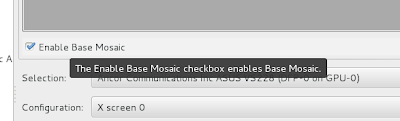


"The Enable Base Mosaic checkbox enables Base Mosaic."


I'm sure it does. I'll bet there's some intern that had 4 hours left to get things checked in, and he had forgotten to make a tooltip for this item, and he couldn't come up with anything better. I would suggest, NVidia, that it's probably better to describe what "Base Mosaic" is, rather than the fact that a checkbox can be checked.


Also, it might be useful to have a name that conveys what your feature does. I'm familiar with how mosaics work; I've made mosaics, they're cool. I've used the Mosaic browser. I know that all my base are belong to someone who set us up the bomb, and I've made my time.


But, I've clicked on everything else at this point, and I've more or less been able to recover from the dead ends, so I set


Option "BaseMosaic" "on"


in the xorg.conf file for all the screens, expecting to get some sort of mirroring or something, but when I restarted, I actually had three monitors light up, and the login prompt was centered on the primary monitor.


Oh, but the left screen was on the right side of the desktop. Ok, that's probably not too bad, I'll just go into nvidia-settings and drag the screen over where it belongs. Done. Restart. Same thing.


Hm, maybe I didn't save. Again. Drag. Save. Restart. Same thing. Huh.


Based on one of the tips from an NVidia employee on one of the forum threads that I saw along the way, I tried using the Gnome-desktop settings / "Displays" control panel, and that had three displays available to position. I dragged those around, hit apply, and I'm done.


So, lessons learned:
  1. Install the official NVidia distribution - or maybe the other one, if it makes you happier. The other instructions involved akmods, which is arguably the smoother path.
  2. Enable "Base Mosaic", which doesn't seem to be documented, and may or may not show up in the nvidia-settings control panel. Good luck.
  3. Use the GNOME desktop settings "Display" control panel to arrange your displays, even though the nvidia-settings control panel also gives you a control that you think would do this.

I like NVidia, I do, and I get that supporting Linux isn't something they need to do. Also, I like Fedora, and I get that making upgrades between versions is hard. But this whole experience seems like it could have been a lot smoother every step of the way.